
Blog
Image Search Techniques: A Guide to How Modern Visual Search Works

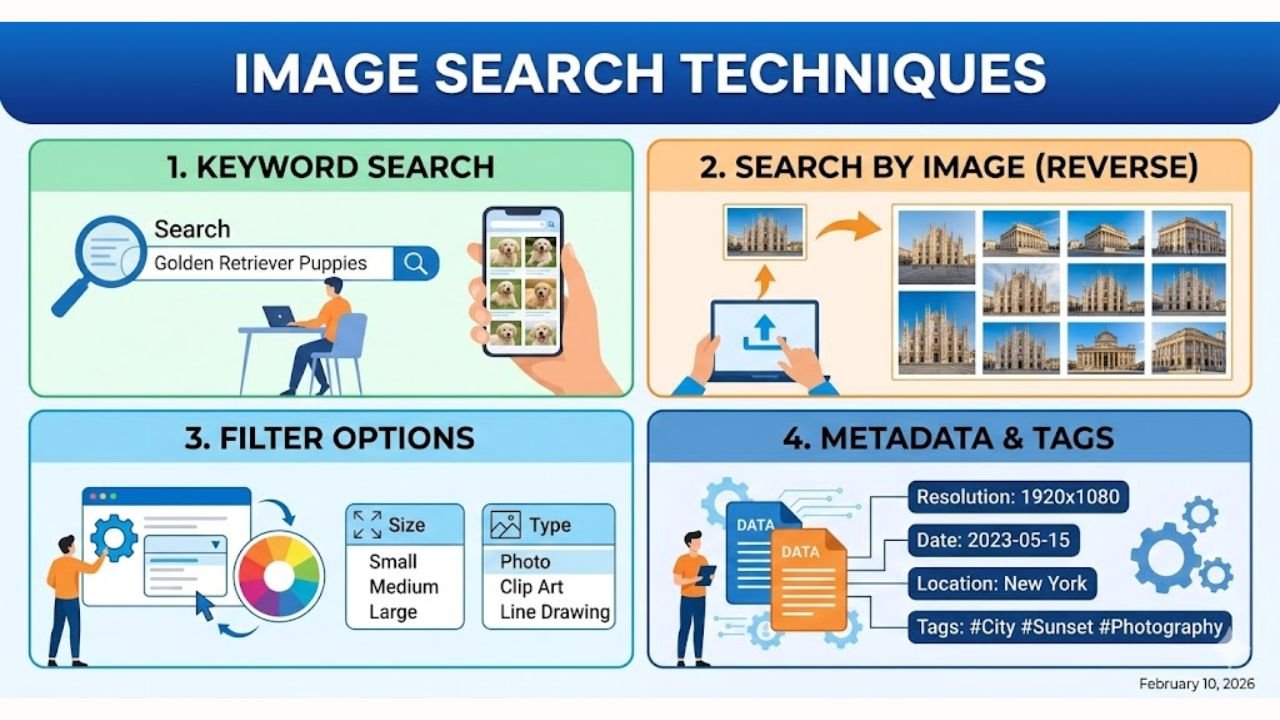
Image Search Techniques have become a major part of everyday life. Today, people use images the same way they once used words. You can point your camera at a shoe, a plant, a menu, or even a landmark, and get answers in seconds. This is possible because modern search tools like Google Lens, Bing Visual Search, Pinterest Lens, and Yandex Images are smarter than ever before.
What makes this time special is how simple these tools feel, even though the technology behind them is very advanced. Visual search can now understand shapes, colors, faces, text, objects, and even feelings or “vibes.” In 2026, people use their phones to learn, shop, travel, and verify the truth of viral photos. Because of this, Image Search Techniques are more important and useful than ever.
Core Image Search Strategies
One of the strongest Image Search Techniques is the “Recursive Strategy.” It sounds complex, but it is very simple. First, you upload a photo to Google Lens. Then, you look for the highest-quality version of the image that Lens can find. After that, you take that clear image and upload it to TinEye. TinEye lets you sort results by “Oldest,” which helps you find where the image first appeared online. This is very helpful when you want to check if an image is real or find out who took the photo.
Another important method is the “Cross-Platform Strategy.” No single search engine can see the whole internet. So, you use several different tools. For example, Bing Visual Search works well for home decor and shopping. Yandex Images is great for faces, people, and landmarks, especially in Europe and Asia. Pinterest Lens helps when you want to find styles or “aesthetic” matches, like outfits or furniture. When you use all three, you get a stronger and more complete result.
Image-to-Text (OCR) Pivoting and Metadata Extraction Techniques
Sometimes, the best Image Search Techniques do not focus on the picture itself, but on the text inside the picture. Tools like Google Lens can read words from menus, street signs, serial numbers, books, or even blurry papers in the background. This is called OCR. Once you have the words, you can search them on Google with special filters like “filetype:pdf” to find documents, manuals, or official guides that match the text you found.
Metadata also plays a big part. A simple photo can hide a lot of information. Metadata such as EXIF, IPTC, and XMP can show the camera model, date, time, GPS location, and even the name of the creator. When someone wants to check if an image is edited or stolen, metadata becomes very useful. It helps you confirm where an image came from and whether it is real.
Geographic Identification
Another powerful set of Image Search Techniques helps you identify unknown places. You can crop an image to show only the skyline or a special building. When you upload that part to Google Images or Yandex Images, the system can match it to a real city or region. This is very helpful for travelers, teachers, journalists, or anyone who wants to learn more about a location.
Shadows can also give you clues. With a tool like SunCalc, you can study the angle of shadows in a photo. This helps you guess the time of day and the direction the camera was facing. After that, you can open Google Earth and match the buildings with the 3D map. When all three steps match, you feel confident that you found the exact location.
Advanced Search Operators & Filtering Systems for Precision Results
Sometimes you need very accurate results. That is when advanced search operators help. Tools like Google Images let you filter by size, color, usage rights, and file type. You can also type commands such as site:instagram.com “keyword” to find images from a specific platform. You can even use imagesize:1920×1080 to look only for HD wallpapers.
These filters save time and make your search cleaner. When you want transparent PNG files, you can select the “Transparent” option. When you want safe-to-use images, you can choose Creative Commons under the Usage Rights menu. These simple tools make Image Search Techniques more effective and easy to control.
Technology Giants Powering Modern Image Search Engines
Big tech companies play a huge role in how Image Search Techniques work today. Google leads the way with Google Lens, Circle to Search, and the “About This Image” tool. These tools help you scan objects, check if a picture is edited, or learn more about something with just one tap. Microsoft also helps shape the field with Bing Visual Search. Bing can look inside a picture and find the exact object you care about, which is very helpful for shopping or home design.
Pinterest also changed the way people search. Its tool, Pinterest Lens, focuses more on style. If you like a dress, a sofa, or a color theme, Pinterest can find matching ideas. Amazon joined the list with its own features like StyleSnap and Amazon Rekognition. These tools help shoppers find what they want by taking a simple photo. Yandex, which many people use across Europe and Asia, is known for its strong facial and landmark recognition. All these giants work together to make Image Search Techniques faster, stronger, and easier for everyone.
Specialized & Independent Image Search Providers Driving Forensics and Source Tracking
Not all image search tools come from big companies. Some smaller companies focus on very specific needs. TinEye is one of the best examples. TinEye can find the oldest version of a picture, even if the picture has been edited many times. This helps you learn who created the image and how it has been used over time.
Other companies focus on deeper tasks. Clarifai helps big businesses by tagging images and filtering unsafe content. Clearview AI works with law enforcement to match faces from large online databases. ViSenze helps online stores by giving shoppers a better visual search experience. There are also tools used in different industries. Stores like IKEA, ASOS, and Wayfair use visual search to help customers find furniture or clothes. Security companies like Verkada and Oosto use computer vision to monitor spaces. Healthcare tools like Iterative Health and DeepC help doctors study medical images with more detail. All of these groups show how wide and useful Image Search Techniques have become.
Hardware, AI Models & Vision Algorithms Behind Image Search Accuracy
Image search is not only about software. It also depends on strong hardware. NVIDIA creates powerful GPUs that help train deep learning models. Qualcomm uses its Snapdragon chips to perform image recognition directly on phones. Intel builds Movidius chips that help drones and smart cameras process images without needing a large computer. These small pieces of hardware make fast visual search possible.
The brain behind these tools comes from AI models. Older methods like Canny edge detection, Sobel filters, and color histograms help computers understand shapes and colors. Mid-level tools like SIFT and SURF help the system find key points inside a picture. Modern deep learning models like CNNs (ResNet, VGG) and Vision Transformers (ViTs) make Image Search Techniques smarter and more accurate. Vision Transformers are especially important because they understand the whole image at once, not small parts. With zero-shot learning, AI can now recognize objects it has never seen before. That is why image search feels so natural in 2026.
Fight Against AI-Generated Images
Today, many images online are AI-generated. So new tools help check if a picture is real or fake. One method is DIRE, which looks at how well the system can rebuild an image. If the image is too perfect, it may be AI-made. Another method looks for digital fingerprints left by tools like DALL-E or Midjourney. These fingerprints help experts understand which model created the image.
Modern models also use “semantic reasoning.” This means the system can explain what is wrong. For example, it may say the lighting looks strange, or a hand has too many fingers, or the shadows are not in the right place. Tools like Google’s “About This Image,” TinEye’s oldest-image sorting, and metadata checks all work together to verify photos. These Image Search Techniques protect people from false news, scams, and misleading content.
Visual SEO
Good visuals need good SEO. Search engines rank clear and sharp images higher. So using high-resolution pictures is important. Adding schema markup also helps search engines understand what the image is about. When you place an image near strong, descriptive text, it becomes easier for Google and Bing to show your picture as a “rich result.”
Metadata is another key part of visual SEO. Clear tags, correct creator info, and simple file names make images easier to find. These small steps help your pictures show up better in search engines and make your content stronger.
Consumer Adoption, Market Growth & Future of Image Search Techniques
People use visual search more than ever. Studies show that 72% of people under 35 use visual search every week. AI accuracy has also improved, rising to almost 94.5% by 2025. Because of this growth, experts say the image recognition market may reach $62 billion soon. This growth comes from many areas—shopping, travel, security, and even healthcare.
The future of Image Search Techniques is very bright. Video search is becoming more common. Phones now use edge computing to process images in under a second. And multimodal search lets you use a picture and text together. Soon, cameras will not just “see.” They will understand the world the way humans do.
Final Thoughts
Image Search Techniques are moving toward a future where everything feels simple and natural. You take a photo, and the system understands what you want. It can find products, explain places, check if an image is real, or match a style you love. Big companies, smaller tech teams, and advanced AI models all work together to make this possible.
In the coming years, image search will feel even more human. It will connect pictures, words, voice, and video into one smooth experience. And as the tools grow smarter, life becomes easier, safer, and much more connected.
FAQs
1. What are Image Search Techniques?
Image Search Techniques are simple methods that help you find information using photos instead of words. You can upload a picture to tools like Google Lens or Bing Visual Search, and the system will identify objects, places, text, or people inside the image.
2. How does Google Lens improve image search?
Google Lens uses AI to study the picture and match it with similar images online. It can read text, identify objects, find products, and even check if an image has been edited. This makes visual search faster and more accurate.
3. Why should I use multiple search engines for one image?
No single search engine sees the entire internet. Tools like Yandex, Bing, Pinterest Lens, and TinEye each have different strengths. Using more than one helps you get the best results and more complete information.
4. Can image search help me check if a photo is real or fake?
Yes. Tools like TinEye, Google’s “About This Image,” and metadata checks can show when and where a picture first appeared. New methods like DIRE and AI fingerprinting also help detect AI-generated images.
5. How can I make my images rank better in search engines?
Use high-quality images, clear file names, and simple alt text. Add schema markup and place each image near helpful, descriptive text. These steps help search engines understand your images and show them in better positions.


The world of celebrity investing has evolved significantly over the years. While luxury cars, startups, and entertainment ventures continue to attract attention, many celebrities are increasingly turning to rental properties as a reliable source of long-term wealth. Real estate has long been recognized as one of the most stable investment vehicles, offering opportunities for passive income, portfolio diversification, and asset appreciation.
Unlike industries that may fluctuate with market trends, rental properties provide a tangible asset that can generate recurring income while increasing in value over time. For celebrities seeking financial security beyond their entertainment careers, real estate has become an attractive option.
The Appeal of Rental Property Investments
One of the primary reasons celebrities invest in rental properties is the opportunity to create consistent cash flow. Whether they own single-family homes, luxury apartments, or multi-unit developments, rental income can provide a steady revenue stream regardless of industry conditions.
Many high-profile investors understand that successful wealth preservation requires diversification. Rental properties offer protection against market volatility while providing long-term growth potential. As a result, real estate often becomes a cornerstone of a celebrity’s investment portfolio.
In addition to generating income, rental properties can offer tax advantages, equity growth, and opportunities for strategic expansion over time.
Real Estate Offers Long-Term Wealth Building
Property values historically appreciate over the long term, making real estate an effective wealth-building strategy. Celebrities and other investors often acquire properties in growing markets where demand remains strong.
As rental income helps cover mortgage expenses and operating costs, property owners can gradually build equity while benefiting from potential appreciation. This combination of income generation and asset growth makes rental properties attractive for investors focused on long-term financial goals.
The Importance of Professional Property Management
Owning rental properties can be rewarding, but it also comes with responsibilities. From maintenance coordination to tenant communication and lease administration, managing rental properties requires time and expertise.
Professional Property Management services help property owners streamline daily operations while maintaining positive tenant relationships. Experienced property managers oversee essential tasks such as rent collection, maintenance scheduling, lease enforcement, and financial reporting.
For celebrities with demanding schedules and multiple investments, professional management provides peace of mind and allows them to focus on other priorities while ensuring their properties remain profitable and well-maintained.
Why Tenant Screening Matters
A successful rental investment often depends on the quality of the tenants occupying the property. This is why tenant screening remains one of the most important aspects of rental property ownership.
Proper tenant screening helps landlords identify qualified applicants who demonstrate financial responsibility, stable income, and a positive rental history. By evaluating prospective tenants before lease approval, property owners can reduce the likelihood of payment issues, lease violations, and property damage.
Investors who prioritize tenant screening often experience fewer disputes and greater long-term stability within their rental portfolios.
The Value of Professional Tenant Screening Services
As rental portfolios grow, many investors choose to work with professional tenant screening services to improve consistency and accuracy during the application process.
These services typically verify employment, review credit history, conduct background checks, and assess rental references. The goal is to provide property owners with reliable information that supports informed leasing decisions.
For celebrities and large-scale investors managing multiple properties, professional tenant screening services can save time while helping minimize potential risks.
Understanding the Tenant Application Screening Process
A thorough tenant application screening process goes beyond reviewing a completed application form. Property owners and managers often evaluate several factors before approving an applicant.
Common components include:
- Employment verification
- Income verification
- Credit history review
- Rental history evaluation
- Reference checks
- Background screening
Comprehensive tenant application screening helps ensure that prospective renters meet the property’s requirements and can fulfill their lease obligations.
Rental Tenant Screening Helps Protect Investments
Rental tenant screening serves as a proactive risk-management strategy for property owners. Identifying reliable tenants before move-in can significantly reduce costly issues that may arise later.
The screening process for tenants provides valuable insights into an applicant’s financial behavior, rental history, and overall suitability. By making data-driven decisions, investors can improve occupancy quality and protect the long-term performance of their rental assets.
For celebrities managing valuable real estate holdings, effective rental tenant screening is often considered an essential part of preserving both property value and investment returns.
The Future of Celebrity Real Estate Investing
As more celebrities seek stable and scalable investment opportunities, rental properties are expected to remain a popular choice. Real estate offers a unique combination of income generation, asset appreciation, and long-term financial security that few other investments can match.
However, success in rental property ownership requires more than simply acquiring properties. Strategic Property Management, effective tenant screening, and sound operational practices all play critical roles in maximizing returns and minimizing risk.
By approaching real estate with a long-term perspective and leveraging professional expertise when needed, celebrities can continue building sustainable wealth through rental property investments.
Conclusion
The growing interest in rental properties among celebrities reflects a broader understanding of the value of real estate investing. Rental income, portfolio diversification, and long-term appreciation make real estate an attractive option for investors seeking financial stability.
At the same time, successful rental property ownership depends on strong management practices. Professional Property Management solutions, comprehensive tenant screening, and reliable tenant screening services help property owners protect their investments while creating positive experiences for tenants.
As celebrity investors continue expanding their real estate portfolios, these best practices will remain key drivers of long-term success.

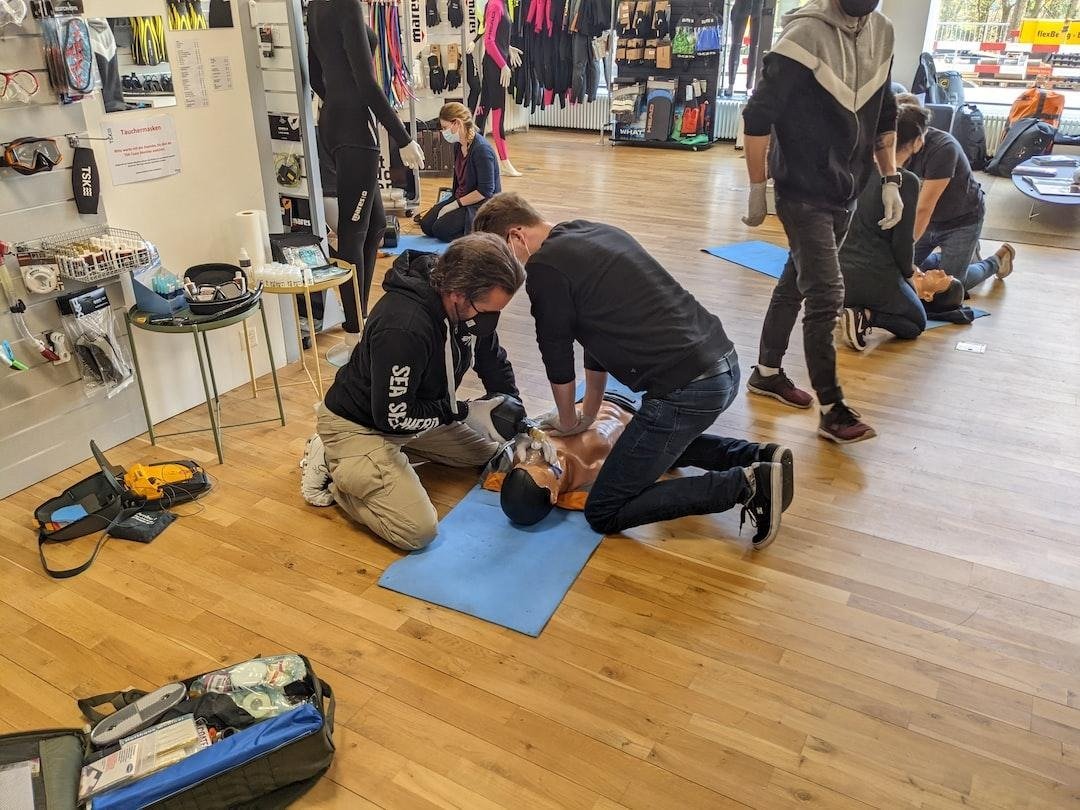
CPR certification gives people the skills to respond during emergencies when every second matters. It teaches simple steps that can help protect a life before medical help arrives. Many people choose this training for work, while others do it for personal reasons.
It can be useful at home, in public places, or in the workplace. Learning these skills can also build confidence during stressful moments. CPR certification programs are designed to be practical, easy to follow, and useful in real-life situations.
The sections below cover how these programs support safety and preparedness in everyday life.
Building Confidence During Emergencies
Emergencies can feel overwhelming without the right training. CPR certification helps people stay calm and take action with more confidence. It teaches what to do when someone stops breathing or becomes unresponsive.
Clear steps make it easier to respond without panic. Practice during training helps those actions feel more familiar. This confidence can make a big difference before emergency services arrive.
Learning Practical Life-Saving Skills
CPR programs focus on skills that can be used right away in real situations. Training often includes chest compressions, rescue breathing, and how to respond safely. These are practical lessons that go beyond theory.
Hands-on learning makes it easier to remember what to do under pressure. Repetition also helps improve response time. These simple skills can be valuable in many everyday settings.
Flexible Training Options for Different Schedules
Many CPR certification programs are designed to fit busy schedules. Some people prefer in-person classes while others choose online learning. A helpful option is using resources from programs like https://cprcertificationnow.com, where training can be completed in a way that works with daily responsibilities.
This flexibility makes it easier for more people to access important safety education. It also allows learners to move at a comfortable pace. More access means more people can be prepared to respond in an emergency.
Supporting Workplace Safety
Many jobs require CPR certification because safety is part of the role. It is especially useful in places where employees work closely with the public or with children.
Training helps staff respond quickly while waiting for medical professionals. It can also improve overall workplace emergency planning. A prepared team creates a safer environment for everyone around them, and this is one reason many employers encourage regular certification.
Helping Families Feel More Prepared at Home
CPR skills are useful beyond the workplace. Parents, grandparents, caregivers, and family members often take certification to feel more prepared at home.
Emergencies can happen without warning in everyday situations. Knowing what steps to take can reduce fear during those moments. It can also provide peace of mind for the whole household.
Encouraging Ongoing Safety Awareness
CPR certification often creates stronger awareness around health and safety. People become more mindful of emergency planning after completing training. They may also feel encouraged to refresh their skills over time.
This keeps knowledge current and useful. Safety awareness can spread into homes, schools, workplaces, and communities. The more people trained, the stronger the response during emergencies can be.
Find CPR Certification Programs for Safety and Preparedness
CPR certification programs give people practical skills that support fast action during emergencies. The training is simple, useful, and relevant in many parts of daily life. It helps people feel prepared when unexpected situations happen. It also builds confidence through practice and clear instruction.
Whether for work, home, or personal growth, these programs offer lasting value. Learning CPR is a step toward stronger safety and better preparedness for everyone.
Should you wish to read more, visit our blog. We’ve got more for you!

The rapid growth of AI computing is pushing data center networks into a new stage of development. As enterprises deploy larger GPU clusters and more advanced LLM platforms, network bandwidth has become one of the most important factors affecting AI performance. It is no longer enough to focus only on GPU specifications or model architecture. Without a high-speed, stable, and scalable optical network, AI computing resources cannot be fully utilized.
The 800G DR8 optical module is designed to meet this growing demand. Compared with traditional 100G or 400G connections, 800G DR8 provides much higher bandwidth capacity for modern data center environments. It is especially suitable for single-mode fiber connections in AI data centers, cloud platforms, and high-performance computing networks. For organizations building large-scale LLM infrastructure, 800G DR8 offers a practical path toward higher network capacity and better long-term scalability.
In LLM training environments, data movement is extremely intensive. Training large language models requires continuous communication between GPU nodes, storage systems, and distributed computing frameworks. Model parameters, gradients, training datasets, and checkpoint files all need to move quickly across the network. If the optical network cannot provide enough bandwidth, the entire AI training process may slow down. This directly reduces GPU utilization and increases operating cost.
800G DR8 helps solve this problem by providing high-speed single-mode connectivity for critical links inside the data center. It can be used for switch-to-switch connections, high-performance aggregation layers, and large AI cluster interconnects. With 800Gbps transmission capacity, the module helps reduce congestion and provides more bandwidth headroom for future AI workload growth.
For AI inference and TOKEN REQUEST platforms, 800G DR8 is equally important. A modern AI service platform may support multiple LLMs, code generation models, embedding models, image models, and multimodal systems at the same time. Each TOKEN REQUEST may be routed to different backend resources depending on model availability, cost, latency, and user demand. This creates complex traffic flows between API gateways, routing systems, inference servers, databases, storage clusters, and monitoring platforms.
As the number of TOKEN REQUESTS increases, backend networks must handle not only model input and output data, but also logging, billing, authentication, usage tracking, and system health monitoring. 800G DR8 provides the bandwidth needed to support these high-volume AI service environments. It helps platforms process more requests, reduce bottlenecks, and improve service consistency during peak traffic periods.
One of the major advantages of 800G DR8 is its use of single-mode fiber. This makes it suitable for longer and more flexible data center connections compared with short-reach multimode solutions. In large AI computing facilities, GPU clusters, storage zones, and core switching systems may be distributed across different rows, rooms, or buildings. Single-mode 800G connectivity allows operators to design the network with greater flexibility and prepare for future expansion.
800G DR8 also supports a cleaner upgrade path for data centers moving beyond 400G. As AI workloads grow, many operators are looking for ways to increase bandwidth without dramatically increasing cabling complexity. Deploying higher-speed modules such as 800G DR8 allows data centers to carry more traffic per port, improve switching efficiency, and simplify network architecture. This is especially valuable in high-density AI environments where rack space, power, and cooling are limited.
For LLM service providers, network reliability is just as important as raw bandwidth. If the optical link becomes unstable, TOKEN REQUESTS may be delayed, failed, or routed inefficiently. This can affect user experience and increase system retry rates. A stable 800G DR8 deployment helps ensure that model access, response delivery, and token usage records remain consistent across the infrastructure.
As AI moves from experimental deployment to large-scale commercial operation, data center networks must be designed for both performance and reliability. 800G DR8 optical modules provide the high bandwidth, single-mode transmission capability, and scalability needed for advanced AI computing environments.
In summary, 800G DR8 is a strong choice for AI data centers that need higher bandwidth and flexible single-mode connectivity. It supports LLM training, AI inference, distributed GPU clusters, and large-scale TOKEN REQUEST processing. For enterprises and service providers preparing for the next generation of AI infrastructure, 800G DR8 offers a powerful foundation for scalable, efficient, and reliable network growth.

Do Breitling Watches Need a Watch Winder? A Complete Owner’s Guide

Why SSD Data Recovery Requires Specialist Expertise: A UK Guide

Abu Dhabi City Tour

Who is Cuppy Enders? The Untold Story of Tommy Shaw’s First Wife

Who Is Sylvia Dale? Learn About The Wife of Johnnie Cochran

Scalable Industrial Solutions with Smart Design Systems & Financial Precision
-
Celebrity8 months ago
Who is Cuppy Enders? The Untold Story of Tommy Shaw’s First Wife
-
Celebrity8 months ago
Who Is Sylvia Dale? Learn About The Wife of Johnnie Cochran
-
 Business5 months ago
Scalable Industrial Solutions with Smart Design Systems & Financial Precision
-
 Celebrity11 months ago
Who Is Yeonmi Park’s Husband? Ex-Husband Ezekiel, Marriage, Divorce & Family Facts and More
-
 Celebrity11 months ago
Happy Dad Net Worth: Owners, Revenue & Brand Value
-
 Technology6 months ago
How System Maintenance Tools Improve Computer Performance and Security
-
 Celebrity12 months ago
Will Sonbuchner Wife: Inside Sonny Side’s Love Life & Private Marriage
-
 Celebrity8 months ago
Meet Max Muñiz: The Son of Jennifer Lopez and Marc Anthony